Data API
Push GeoJSON or CSV datasets directly into a project from an external pipeline — no UI clicks, no manual import. A single HTTP request creates or replaces a layer; subsequent calls with the same name overwrite in place.
The Data API is intended for automated systems (CI jobs, scheduled scripts, monitoring pipelines) that need to keep a project's data in sync with an external source. For one-off uploads, use the in-app import flow instead.
Endpoint
POST https://app.augmentcity.no/api/v1/collections    — create or replace a layer
GET  https://app.augmentcity.no/api/v1/collections    — list API-managed layers in the project
Authentication
Every request needs an opaque bearer token:
Authorization: Bearer gp_<your-token>
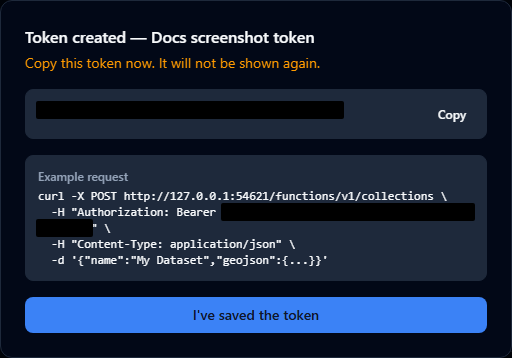
Tokens start with the literal prefix gp_ (GeoPlanning) followed by 32 random bytes encoded as base64url. They are stored as a SHA-256 hash on the server — the raw value is shown to you once, when the token is created. If you lose it, generate a new one and revoke the old one.
Generating a token

Tokens generated in Organisation Settings are org-scoped: a single token can push data into any project in your organisation. Specify which project a request targets by including project_id in the request body (see Targeting a project below). A token generated in Project Settings → Data API is instead bound to that one project, and its requests need no project_id.
To generate a token:
-
Open your Organisation Settings and click the Data API tab.
-
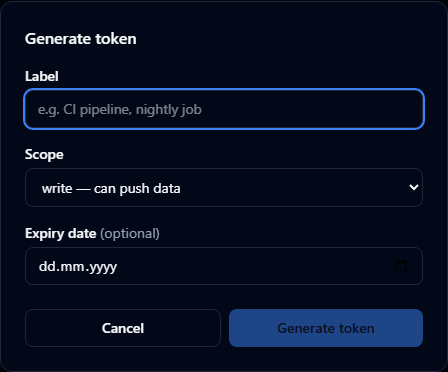
Click New token.
-
Give it a label (e.g.
nightly-build), pick a scope (writefor pushing data,readfor listing only), and an optional expiry date. -
Click Generate token.
-
Copy the token value now — it will not be shown again.
Tokens are visible to org owners and admins only. Plain org members, and project editors/contributors who are not org owners or admins, cannot view or manage Data API tokens.
Revoking a token
In the same settings panel, click Revoke next to the token. Any pipeline using it will start receiving 401 ERR_INVALID_TOKEN immediately.
Pushing data — POST /collections
Two body shapes are supported. Both require:
name— the layer is identified in the project by that name, and subsequent calls with the same name upsert in place.project_id— the project the layer belongs to. Data is always written into a project; there is no org-level data store. Tokens generated in Organisation Settings are org-scoped and therefore not bound to a project, so they must name one in every request — omitting it fails with400 ERR_PROJECT_REQUIRED. See Targeting a project. A project-scoped token (generated in Project Settings → Data API) is already bound to its project and can leave the field out.
GeoJSON body
curl -X POST https://app.augmentcity.no/api/v1/collections \
  -H "Authorization: Bearer gp_<your-token>" \
  -H "Content-Type: application/json" \
  -d '{
    "name": "Parking sensors",
    "project_id": "<project-uuid>",
    "geojson": {
      "type": "FeatureCollection",
      "features": [
        {
          "type": "Feature",
          "geometry": { "type": "Point", "coordinates": [10.75, 59.91] },
          "properties": { "id": "p-001", "occupied": true }
        }
      ]
    }
  }'
The geojson value must be a FeatureCollection with at least one Feature. Each feature must have a geometry.
CSV body
curl -X POST https://app.augmentcity.no/api/v1/collections \
  -H "Authorization: Bearer gp_<your-token>" \
  -H "Content-Type: application/json" \
  -d '{
    "name": "City offices",
    "project_id": "<project-uuid>",
    "format": "csv",
    "data": "lat,lon,name\n59.91,10.75,Oslo\n55.67,12.56,Copenhagen"
  }'
The CSV must have a header row. The Data API automatically detects the coordinate columns by header name (case-insensitive):
- Latitude:
lat,latitude,y,northing - Longitude:
lon,lng,longitude,x,easting
Rows where lat or lon cannot be parsed as a number are silently skipped. All other columns become feature properties. Quoted fields with embedded commas are supported (e.g. "Smith, John"); double quotes inside a quoted field are escaped as "".
Targeting a project
Tokens generated in Organisation Settings are org-scoped: they can write to any project in the organisation, but they are not tied to one, so every request must say which project it targets. Put project_id in the body — the value is the project's UUID, which is the last path segment of the project URL in the app (/org/<slug>/projects/<project-uuid>):
curl -X POST https://app.augmentcity.no/api/v1/collections \
  -H "Authorization: Bearer gp_<your-token>" \
  -H "Content-Type: application/json" \
  -d '{
    "name": "Air quality stations",
    "project_id": "00000000-0000-0000-0000-000000000000",
    "geojson": { "type": "FeatureCollection", "features": [...] }
  }'
The project must belong to the same organisation as the token, otherwise the request fails with 403 ERR_PROJECT_NOT_IN_ORG.
Response
{
  "success": true,
  "layer_id": "00000000-0000-0000-0000-000000000000",
  "created": true
}
| Field | Meaning |
|---|---|
layer_id | Stable UUID of the layer. Same value on subsequent updates of the same name. |
created | true if a new layer was created, false if an existing layer was replaced. |
Status code is 201 on create, 200 on replace.
Listing layers — GET /collections
curl -X GET https://app.augmentcity.no/api/v1/collections \
  -H "Authorization: Bearer gp_<your-token>"
For org-scoped tokens, pass the project ID as a query parameter:
curl -X GET "https://app.augmentcity.no/api/v1/collections?project_id=<uuid>" \
  -H "Authorization: Bearer gp_<your-token>"
Response:
{
  "success": true,
  "items": [
    {
      "id": "00000000-0000-0000-0000-000000000000",
      "name": "Parking sensors",
      "type": "geojson",
      "created_at": "2026-04-29T08:31:00Z",
      "updated_at": "2026-04-29T10:14:00Z"
    }
  ]
}
Only layers created via the Data API are returned — manually-imported layers are excluded.
Error codes
All errors return JSON of shape { "success": false, "message": "ERR_*" } with an HTTP status. Some also carry a human-readable hint field explaining how to fix the request — message is the stable value to branch on, hint is for humans and may change.
| Status | Code | Meaning |
|---|---|---|
| 400 | ERR_NAME_REQUIRED | name field missing or empty. |
| 400 | ERR_INVALID_BODY | Request body is not valid JSON. |
| 400 | ERR_PROJECT_REQUIRED | Org-scoped token without project_id in body (POST) or query (GET). Response includes a hint. |
| 400 | ERR_GEOJSON_NULL | geojson is null or not an object. |
| 400 | ERR_GEOJSON_MISSING_TYPE | GeoJSON has no type field. |
| 400 | ERR_GEOJSON_INVALID_TYPE | GeoJSON type is not FeatureCollection. |
| 400 | ERR_GEOJSON_MISSING_FEATURES | No features array. |
| 400 | ERR_GEOJSON_EMPTY_FEATURES | Empty features array. |
| 400 | ERR_GEOJSON_FEATURE_MISSING_TYPE | A feature has no type. |
| 400 | ERR_GEOJSON_FEATURE_INVALID_TYPE | A feature's type is not Feature. |
| 400 | ERR_GEOJSON_FEATURE_MISSING_GEOMETRY | A feature has no geometry. |
| 400 | ERR_GEOJSON_GEOMETRY_MISSING_TYPE | A geometry has no type, or is not an object (e.g. a string, number, or array). |
| 400 | ERR_GEOJSON_GEOMETRY_INVALID_TYPE | A geometry's type is not one of the seven RFC 7946 geometry types, or a GeometryCollection is nested inside another GeometryCollection (disallowed by RFC 7946 §3.1.8). |
| 400 | ERR_GEOJSON_GEOMETRY_MISSING_COORDINATES | A geometry has no coordinates array (or a GeometryCollection has no geometries array). |
| 400 | ERR_CSV_NO_COORDINATES | CSV has no detectable lat/lon columns. |
| 401 | ERR_INVALID_TOKEN | Token missing, malformed, not found, or expired. |
| 403 | ERR_FORBIDDEN | Token has read scope only (POST requires write). |
| 403 | ERR_PROJECT_NOT_IN_ORG | Org-scoped token, but project_id belongs to a different org. |
| 413 | ERR_PAYLOAD_TOO_LARGE | Request body exceeds 25 MB. |
| 500 | ERR_INTERNAL / ERR_STORAGE_UPLOAD / ERR_INSERT / ERR_UPDATE | Server-side failure — retry safe. |
Limits
| Limit | Value |
|---|---|
| Maximum request body size | 25 MB |
| Request timeout | 120 seconds. A request that exceeds it fails with a non-JSON ROUTER_EXTERNAL_TARGET_ERROR response. Large uploads over slow connections are the realistic trigger. |
| Rate limiting | None in v1 — please be reasonable. May be added later. |
| Layer name length | Same as the in-app layers panel (no specific cap enforced by the API itself). |
| Token expiry | Optional. If set, requests with the token after the expiry date return 401 ERR_INVALID_TOKEN. |
Migration from the old /public/v1/collections API
If you are coming from the previous platform's RS256 JWT-based collections API:
| Old | New | |
|---|---|---|
| Endpoint | POST /public/v1/collections | POST /api/v1/collections |
| Token | RS256 JWT with ws + scope claims | Opaque gp_<token> |
| Token source | Backend's JwtGeneratorService | Organisation Settings → Data API tab |
| Workspace binding | ws claim in JWT | Encoded in the token record |
| Name conflict | 400 ERR_NAME_TAKEN | Upserts in place — no error |
| List endpoint | GET /v1/assets/datasets | GET /api/v1/collections |
| List response key | items[].publicId | items[].id |
The Authorization: Bearer … header pattern and the request body shape ({ name, geojson } and { name, format, data }) are unchanged. Typical migration is a 3-line diff: new endpoint URL, new token, drop any workspace_id field from the body.