Importing Data
AugmentCity supports two ways to add data to a project:
- Upload a file — import data you have stored locally
- Connect an external source — stream live data from a server
Both options are available in the Layers panel.

File upload
Click + Add layer to open the Import Layer dialog and upload data from your device. The file is stored in the project and loaded into the 3D viewer.
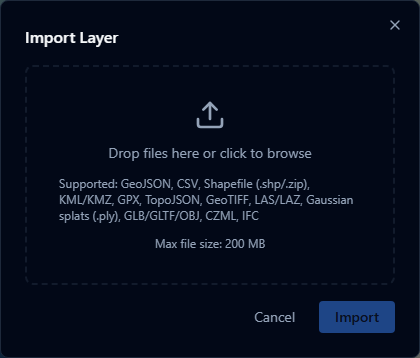
Supported formats:
| Format | Extension(s) | What it produces |
|---|---|---|
| GeoJSON | .geojson | Vector layer |
| GPX | .gpx | Vector layer (converted to GeoJSON) |
| TopoJSON | .topojson | Vector layer (converted to GeoJSON) |
| CSV / TSV | .csv | Point layer (coordinate or address columns auto-detected; all other columns become attributes) |
| Shapefile | .shp, .zip | Vector layer (converted to GeoJSON) |
| KML / KMZ | .kml, .kmz | Vector layer |
| CZML | .czml | Time-dynamic layer |
| IFC | .ifc | 3D building model (converted to GLB) |
| 3D Model | .glb, .gltf | 3D model layer |
| Point Cloud | .las, .laz | Point cloud layer |
| Gaussian Splat | .ply | 3D Gaussian splat layer (converted to 3D Tiles) |
| GeoTIFF | .tif, .tiff | Raster imagery layer (RGB/RGBA) or terrain layer (elevation) |
File size limit: 200 MB per file.
tip
If a GeoJSON or CSV file has a time/date column with multiple rows per location or entity — such as repeated sensor readings — AugmentCity can play it back over the timeline as an animated Temporal Series instead of showing every row at once.
External sources
Click Add URL to open the Add External Layer dialog and link a live data source. No file is stored — the data is fetched from the server each time the layer is loaded.
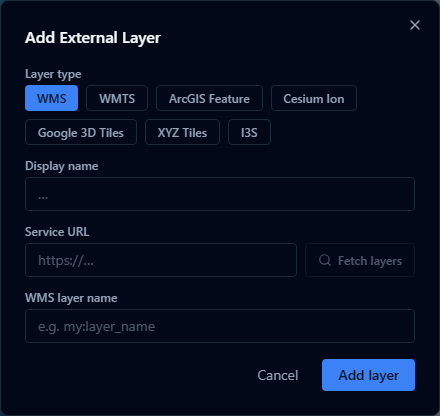
Supported sources:
| Source | Description |
|---|---|
| WMS | OGC Web Map Service — raster imagery tiles |
| WMTS | OGC Web Map Tile Service — pre-tiled raster imagery |
| ArcGIS Feature Server | Esri ArcGIS REST API vector features |
| XYZ Tiles | Slippy map tile URLs (e.g. OpenStreetMap) |
| Cesium Ion | Cesium Ion 3D assets (tilesets, terrain, imagery) |
| Google 3D Tiles | Google Photorealistic 3D Tiles via the Maps Tiles API |
| I3S Scene Layer | OGC I3S / ArcGIS Scene Service 3D scene layers |