3D Model Styling
When a GeoJSON point layer uses model visualisation mode, each point is replaced with a 3D glTF model. This is useful for placing trees, buildings, vehicles, or other objects at specific locations.
Model source
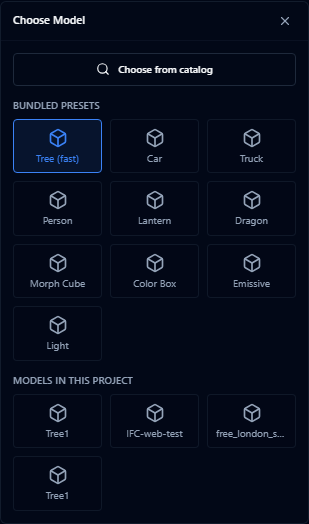
Open Choose Model in the style editor, then pick from one of these sources:
| Source | Description |
|---|---|
| Bundled presets | Lightweight models included with AugmentCity |
| Models in this project | Models already uploaded or added from the catalog in this project |
| Choose from catalog | Reusable 3D assets published by AugmentCity, your team, or others |
To vary the model per feature instead of using one model for the whole layer, use the separate By Attribute section in the style editor — it assigns different models to different attribute values.
To use a new .glb or .gltf file, upload it with Add layer first (see 3D Models (GLB & GLTF)). The model then appears under Models in this project. Model customization does not upload files.
Reusable project models
Use project models when the same object appears in more than one layer, scenario, or workshop exercise. The picker has reusable model sources that look similar but behave differently:
- Models in this project — imported model layers and pinned catalog assets in the current project. Use these when a GeoJSON point layer should display the same uploaded or catalog model at every point.
- Choose from catalog — reusable 3D assets published by AugmentCity, your organization, or the community. Click Use as model to pin the selected catalog version to the project before selecting it.
From the full Catalog, a reusable 3D asset also offers:
- Add to project assets — save the pinned model under Models in this project without placing it
- Place in scene — choose a map position and create a normal standalone 3D model layer
- Use as model — select it for point model visualisation from the model picker
A catalog 3D asset can be used in two ways:
- For point model visualisation, where every point in a layer uses the model saved under Models in this project
- For standalone placement, where Place in scene places one model directly on the map as its own 3D model layer
Imported model layers listed under Models in this project are reusable as point visualisation sources. To place an uploaded model directly on the map as its own layer, import it with Add layer (see Importing) — it is placed on the map immediately, the same as any other 3D model layer.
When a scenario uses an object-library model, the scenario stores the selected library asset reference. Public shares also include the resolved model source, so recipients can see the same objects in read-only mode.
Standalone models placed from the library are also restored safely when a scenario or shared link loads. If older layer records are missing optional placement metadata, AugmentCity uses the model's stored source and default placement values instead of failing to load the layer.
Models in this project are available to members of that project. Catalog assets remain pinned to the version that was added, even if a newer version is published later.
Fast tree rendering
The preset library includes Tree (fast) for dense tree or vegetation point layers. This preset uses lightweight tree impostors instead of loading a full glTF model per feature, so it is better suited to hundreds or thousands of trees.
When the tree preset is selected, the style panel shows a Tree impostor section:

| Setting | Description |
|---|---|
| Stylized 2D | Uses the generated stylized tree texture |
| Realistic 2D | Uses a selected tree texture on a lightweight plane |
| Cross-plane 3D | Uses crossed planes for more volume while staying lighter than full 3D models |
| Texture | Choose a species-style texture such as English oak, European beech, horse chestnut, Lombardy poplar, maple, Scots pine, silver birch, spruce, or weeping willow |
| Face camera | Keeps 2D trees facing the camera when enabled |
Use By attribute with the tree preset when a single point layer contains species or tree-type fields. All mapped values must use the tree preset for the fast tree renderer to stay active.
Zoom to on a model layer frames the model's actual size — the camera flies close for a small object and stays back for a large one, instead of using a fixed distance.
Positioning

| Setting | Description |
|---|---|
| Terrain alignment | Clamp to ground / Relative to ground / Absolute altitude |
| Z offset | Vertical offset in metres above the alignment point |
| Heading | Fixed rotation angle (0–359°) or from a numeric attribute field |
Scale
| Mode | Description |
|---|---|
| Fixed | Single scale value for all models |
| From dataset | Scale driven by a numeric attribute |
| Random | Random scale between min and max values |
Material
- Preserve original toggle — keeps the model's built-in materials
- Colour tint — apply a colour overlay (manual, from dataset, or gradient)
- IBL factor slider (0–2) — controls how strongly the model reflects ambient lighting. Higher values create more realistic metallic and glossy surfaces
Labels
- Enable/disable toggle
- Field — which attribute to display
- Font size
Use "By attribute" model source to place different types of objects (e.g. different tree species or building types) from a single layer by mapping an attribute field to model names.