Point Cloud Styling
Point cloud layers (LAS/LAZ files) display millions of 3D surveyed points. The style editor controls how points are coloured and which classification types are visible.
Colour mode

| Mode | Description |
|---|---|
| From Data | Use the colour values embedded in the point cloud file (RGB) |
| By Class | Colour each point by its LAS classification class. Click any class to change its colour. Click Reset to restore default colours |
| Intensity | Colour by return intensity value. Adjust the max intensity slider to control the brightness range |
| Solid Color | Single solid colour for all points |
Classification filter
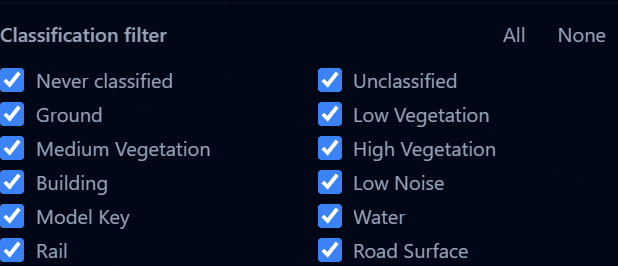
When using By Class colour mode, you can show or hide specific LAS classification types:
| Class | Examples |
|---|---|
| Never classified | Points the classifier did not process |
| Unclassified | Points not yet assigned a class |
| Ground | Bare earth, roads |
| Low / Medium / High Vegetation | Grass, shrubs, trees |
| Building | Rooftops, structures |
| Low Noise | Measurement errors, outlier points |
| Model Key | Key points used to build the surface model |
| Water | Lakes, rivers |
| Rail | Railway tracks |
| Road Surface | Paved roads |
Use the All and None buttons to quickly select or deselect all classes. If your dataset uses additional classification codes, use Add class to add them to the list.
tip
Hide vegetation and noise classes to get a cleaner view of buildings and ground surfaces. This is especially useful for urban planning analysis.
Point size

Adjust the point size from 1 to 10 pixels. Larger points fill gaps but can obscure detail at close range.