Cesium Ion Assets
Cesium Ion is a cloud platform for hosting and streaming 3D geospatial content — high-resolution terrain, photogrammetry models, 3D city models, and point clouds. If your organisation has assets hosted on Cesium Ion, you can add them directly by asset ID.
Connecting
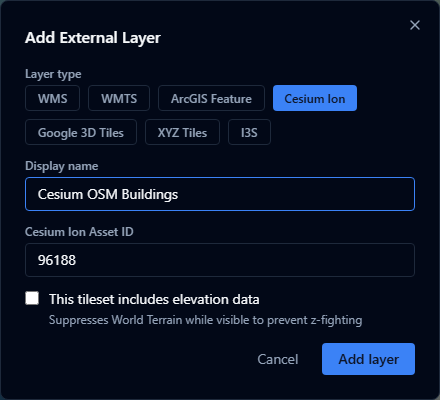
- Open the Layers panel and click Add URL (in the panel header).
- Choose Cesium Ion as the layer type.
- Enter the Asset ID — a numeric ID from your Cesium Ion account (e.g.
354759). - If the asset is a terrain dataset, tick Includes elevation so the platform renders it as terrain rather than a 3D tileset.
- Click Add.
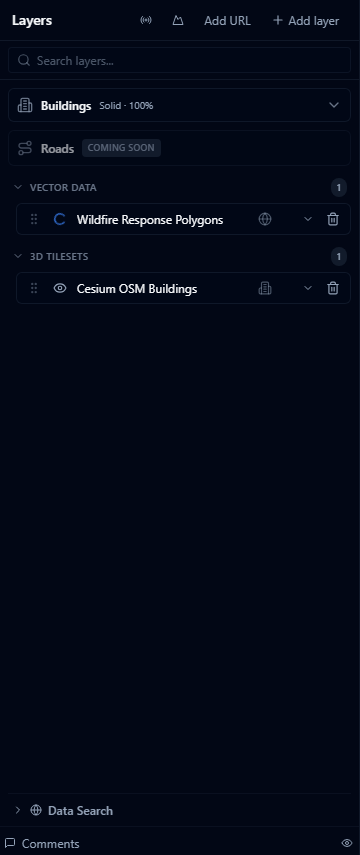
Finding your asset ID
Log in to ion.cesium.com, open My Assets, and click the asset. The numeric ID is shown in the URL and in the asset details panel.
Supported asset types
| Type | Description |
|---|---|
| 3D Tiles | Photogrammetry captures, BIM models, 3D city models |
| Terrain | Quantized-mesh terrain datasets (tick Includes elevation) |
| Imagery | Raster imagery tiles |
| Point Cloud | LAS/LAZ-derived 3D Tiles point clouds |
Access and permissions
AugmentCity uses the Cesium Ion token configured for your deployment. The asset must be:
- Public — accessible without a token, or
- Shared with the Ion token used by your AugmentCity installation
Assets in a personal Ion account that are not shared will return a 401 error when the layer is loaded.
Includes elevation
Tick Includes elevation when the asset is a terrain dataset (quantized-mesh). This tells the viewer to treat it as a replacement for the world terrain surface rather than as a floating 3D model.
Do not tick this for photogrammetry captures or 3D buildings — those should be treated as tilesets positioned on top of the terrain.