WMTS (Web Map Tile Service)
WMTS is an OGC standard for serving pre-tiled raster maps. It is faster than WMS because tiles are cached on the server. Use it for high-resolution basemaps, aerial imagery, or thematic maps from national mapping agencies.
Connecting a WMTS
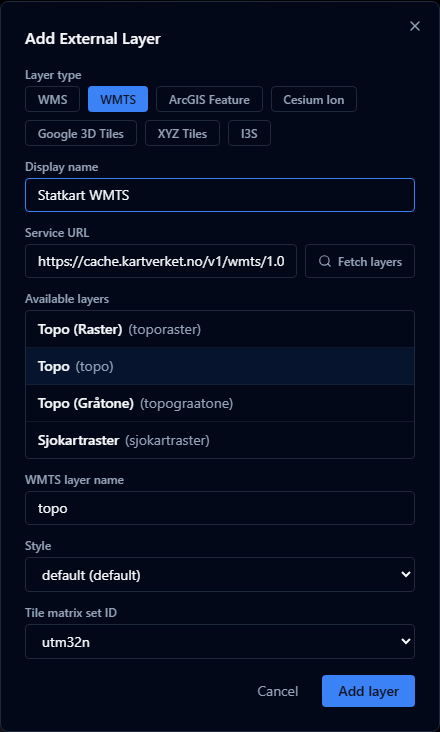
- Open the Layers panel and click Add URL.
- Choose WMTS as the layer type.
- Enter the service URL.
- Click Fetch layers — AugmentCity parses the
GetCapabilitiesresponse. - Select a layer from the list. The style and tile matrix set are filled in automatically.
- Click Add layer.
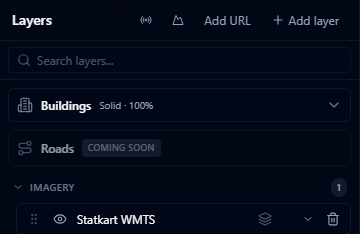
What is configured automatically
When you use Fetch layers, AugmentCity reads:
- Layer identifier, title, and abstract
- Available styles — the default style is selected automatically
- Tile matrix set links — the first available set is selected
- Image format — the first supported format is used
You can change the style or tile matrix set using the dropdowns before adding the layer.
Manual entry
If Fetch layers fails, you can enter the required fields manually:
| Field | Example | Notes |
|---|---|---|
| Layer identifier | ortofoto_2023 | Exact identifier from the service |
| Style | default | Leave blank if the service has only one style |
| Tile matrix set | EPSG:3857 | The CRS identifier of the tile grid |
URL format
Enter the base URL of the WMTS service:
https://example.com/geoserver/gwc/service/wmts
https://cache.kartverket.no/v1/wmts/1.0.0/WMTSCapabilities.xml
Limitations
- WMTS layers are streamed live and are not stored in the project
- The server must be publicly accessible or reachable from the user's browser (CORS must be enabled)