Feature Inspector
Click any feature on the map (GeoJSON polygon, point, line, or CZML entity) to open a floating panel showing all its attribute properties.
Inspecting a feature
- Click a feature on the map.
- A popup appears near the clicked location showing all properties in a key/value table.
- The popup stays within the viewport edges so it never goes off-screen.
In public share links, the same popup is available in read-only mode. Recipients can inspect feature attributes, but they cannot edit data from the public viewer.
Editing, copying, and moving GeoJSON features
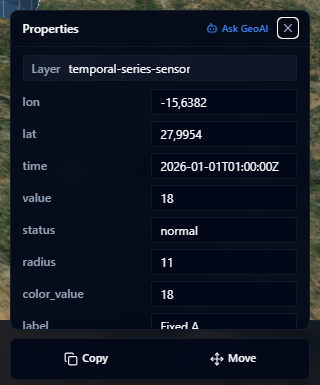
Project members with edit access can update properties on editable GeoJSON features from the Properties popup. Change the values you need, then click Save. Click Cancel to discard changes before saving.
The action toolbar appears directly below the Properties popup when the selected feature can be edited.
| Action | What it does |
|---|---|
| Copy | Creates a duplicate of the selected point, line, or polygon for placement |
| Move | Moves the selected point, line, or polygon to a new position |
After you start Copy or Move, adjust the draft feature on the map and click Save in the toolbar. Use Cancel to return to the original feature without saving.
Public share and embed links are read-only. Recipients can open the Properties popup, but they cannot edit attributes, copy features, or move features.
Closing
Click the × button or press Escape to dismiss the popup. Clicking elsewhere on the map also closes it.